Transparency Note: This post contains affiliate links. If you use these links to buy something, we may earn a commission at no extra cost to you. Thanks for your support!
Your Moleskine is Slowing You Down.
There is a specific panic every executive knows: flipping through three different black notebooks, trying to find that one specific diagram from the Q3 strategy meeting, only to realize you left that specific notebook in your carry-on… which is currently in an overhead bin in London.
Paper has a friction cost. It is heavy (adding 1-2 lbs to your briefcase), unsearchable, and unsecure. If you lose your notebook, you lose your intellectual property.
In 2025, carrying dead trees is an operational risk. The modern executive needs a system that captures handwriting instantly but stores it with the security and searchability of a database.
We tested the top digital notebooks on the market to find the ones that actually replace paper—without adding a new distraction to your workflow. Here is the efficiency stack for digital note-taking.
Top Pick Summary
| Category | The Choice |
| The Purist (Best for Focus) | ReMarkable Paper Pro The closest feel to real paper. No distractions, no glare, just thinking. |
| The Powerhouse (Best for Work) | Onyx BOOX Note Air 5 C Full Android apps (Outlook, OneNote) on a color e-ink screen. |
| The All-Rounder (Best Value) | iPad Air (M2) The safe choice. A powerful computer that doubles as a notebook. |
1. The Purist Choice: ReMarkable Paper Pro
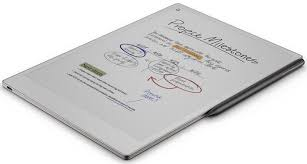
- The Pitch: The ReMarkable Paper Pro isn’t about what it can do; it’s about what it can’t do. It intentionally removes email, slack, and browser distractions to force you into a state of “deep work.”
- The Good:
- The “Canvas Color” Display: Finally, ReMarkable has added color without losing that signature rough, paper-like texture. It’s not glowing or vibrant like an iPad; it looks like actual colored ink on paper.
- The Reading Light: Unlike the older models, this version has a built-in light, meaning you can finally review contracts on red-eye flights without an external lamp.
- Battery Life: Because it runs a simple Linux system, not full Android, you can easily go two weeks on a single charge.
- 🔑 Executive Use Case: “This device is specifically recommended for for long, uninterrupted f2f meetings, like Long strategy sessions, where deep uninterrupted focus is required.”
- The Bad:
- Closed Ecosystem: Syncing is better than it used to be (Google Drive/OneDrive works for file transfer), but you cannot “live edit” a Microsoft OneNote page. It is a digital island.
- Verdict: The best choice for the CEO or Writer who needs to disconnect from the noise and just think.
2. The Powerhouse Choice: Book Note Air 5 C
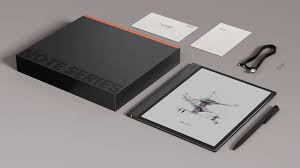
The Pitch: If you need to read colorful charts in PDF reports and reply to Slack messages without hurting your eyes, this is your tool. Unlike the ReMarkable, the BOOX runs full Android 15, meaning your entire office ecosystem fits on this e-ink screen.
- The Good:
- Full App Store: It runs Outlook, OneNote, Kindle, and Slack natively. You don’t need to “sync” your notes to your computer; they are already there in the cloud.
- Kaleido 3 Color Screen: The colors are pastel and muted (easy on the eyes) but distinct enough to highlight spreadsheets or mark up architectural plans effectively.
- Speed: The new processor handles large PDF blueprints much faster than the ReMarkable.
- The Bad:
- Battery Life: Because it runs Android and Wi-Fi constantly, expect 2–3 days of battery, not 2 weeks.
- Learning Curve: It feels more like a tablet computer than a simple notebook; the settings menu can be overwhelming for non-techies.
- Verdict: The best choice for the “Digital Nomad Executive” who needs their full workflow on an eye-friendly screen.
3. The All-Rounder: iPad Air (M3) + Apple Pencil Pro
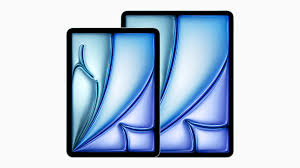
- The Pitch: The safe choice. It isn’t just a notebook; it is a future-proof computer. With the new M3 chip, it handles AI summarization and large workflow tasks faster than any e-ink tablet could dream of.
- The Good:
- Apple Pencil Pro Support: The “Squeeze” gesture allows you to switch between pen and eraser instantly without lifting your hand—a massive time-saver for fast note-takers.
- AI Integration: The M3 chip runs the latest on-device AI tools, allowing you to instantly summarize your handwritten meeting notes into text.
- The Screen: The Liquid Retina display is unmatched for viewing photos or videos—far superior to any e-ink screen.
- The Bad:
- Distractions: It is an “everything machine.” It takes immense willpower not to check Instagram or YouTube while you are trying to write.
- Eye Strain: Unlike the other two, this is a backlit LCD screen. Staring at it for 4 hours of writing will tire your eyes out.Distractions: It is an “everything machine.” It takes immense willpower not to check Instagram or YouTube while you are trying to write.
- Eye Strain: Unlike the other two, this is a backlit LCD screen. Staring at it for 4 hours of writing will tire your eyes out.
- Verdict: The best choice for the Generalist who wants a device that will still be fast in 2030.
Buying Guide: How to Choose Your Digital Notebook
Buying a digital notebook isn’t about specs; it’s about knowing your own workflow weaknesses. Do you need to be forced to focus, or do you need to move fast? Here is how the three categories compare on the features that matter most to an executive.
1. Screen Feel (The “Scratch” Factor)
If you are coming from a Moleskine or legal pad, this is the most jarring change.
- The Purist (ReMarkable): This has the highest friction. It physically feels like pencil on paper. It makes a scratching sound. If your best thinking happens with a pencil in hand, this is the only one that will satisfy that tactical itch.
- The Powerhouse (BOOX): A middle ground. It has a factory-applied matte screen protector that gives some resistance, but it is smoother than the ReMarkable. It feels like a high-quality gel pen on smooth paper.
- The Tablet (iPad): This is glass. It is slippery, and the stylus makes a hard “tap” sound when it hits the screen. You can buy “PaperLike” screen protectors to mitigate this, but out of the box, it feels 100% digital.
2. Battery Life (The “Range Anxiety” Test)
How often are you willing to charge?
- ReMarkable: 2 Weeks. You can leave the charger at home for a short business trip. It sips power because it isn’t constantly “thinking.”
- BOOX: 2-3 Days. Because it runs Android and Wi-Fi, it burns power faster. Treat it like your phone—charge it every other night.
- iPad: 10 Hours. This is a daily charge device. If you forget to plug it in overnight, it will be dead by your 2:00 PM meeting.
3. Syncing & Ecosystem (Where do the notes go?)
This is usually the dealbreaker.
iPad: The Apple Ecosystem. If you live in a Mac world (iPhone + MacBook), AirDropping notes is seamless. If you use a PC at work, getting files off an iPad can be a friction point.
ReMarkable: Uses its own “Cloud.” You can email PDFs to yourself or use their desktop app to drag-and-drop files, but you cannot “live sync” with OneNote or Evernote. It is a digital island—secure, but isolated.
BOOX: It is the ecosystem. Because it has the Google Play Store, you simply install the Outlook or OneNote app. Your notes sync directly to your corporate server just like they do on your phone.